GlyphGlance

FREE / NATIVE MAC VIEWER

Your documents.
A clearer read.

Markdown, Mermaid diagrams, and Fountain documents, beautifully in view. Read in Finder, give a diagram room to breathe, and share a sharp PDF. Your original file stays untouched.

Free for Apple silicon Macs. Requires macOS 26 or newer, including macOS 27.

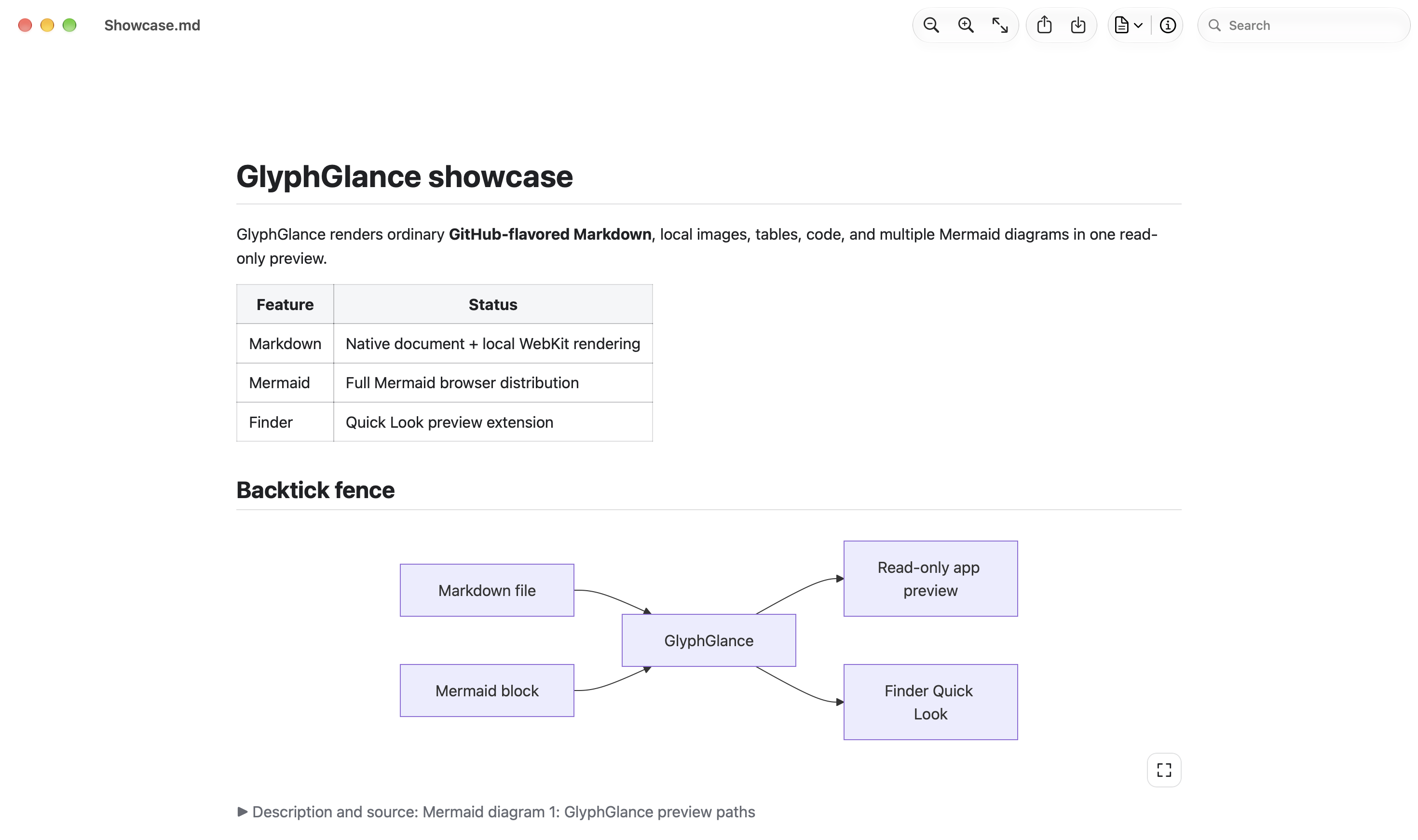
GlyphGlance with its native zoom, sharing, PDF export, document info, and search toolbar above a Markdown document and Mermaid flowchart.
GLYPHGLANCE / MARKDOWN + MERMAID Native toolbar and a bundled example document.

A QUICK LOOK GOES A LONG WAY

Select a file.
Press Space.

Read a README, review an architecture note, or inspect a research write-up directly in Finder. Supported diagrams, formulas, and highlighted code appear alongside the explanation.

  1. Enable the extension.

    Turn on GlyphGlance Quick Look in macOS System Settings. If another Markdown preview extension takes priority, you may need to disable that competing extension.

  2. Choose your document.

    Select a supported Markdown, Mermaid, or Fountain file in Finder.

  3. Take a closer look.

    Press Space to read the inline preview. Open the document in GlyphGlance for search, enlarged diagrams, and PDF export.

BUILT FOR THE READING PART

See the connections.
Keep the context.

From development documentation to technical writing and process reviews, GlyphGlance brings the diagram, the equation, and the explanation into one readable document.

01

Give your diagrams
some room.

Render embedded Mermaid flowcharts, sequence diagrams, class diagrams, state diagrams, timelines, and mind maps—or open a standalone Mermaid file. In the app, use the enlarge control for a separate display-sized view, then press Escape to return.

Finder Quick Look keeps the simpler inline preview. An expandable Description and source section gives you access to the original diagram text.

02

Share the detail.
Preserve the clarity.

Export paginated PDFs with selectable, searchable text. Mathematical glyphs and Mermaid SVG diagrams remain vector content wherever possible; bitmap images remain bitmaps.

Markdown headings become a hierarchical PDF Table of Contents in the viewer’s sidebar. Your reading zoom doesn’t change the exported layout.

03

Find your place.
Read your way.

Zoom to fit, search rendered text with Command–F, and inspect file details in the Info sidebar. Customize the native toolbar or use Edit → Speech → Start Speaking to listen to selected text—or the whole document.

04

Your source stays
exactly as it was.

Read, change the preview profile, enlarge a diagram, or export a PDF without editing the original file. Rendering happens locally using bundled resources, with no in-app account or hosted rendering service.

Supported local content works offline. Remote images are not loaded, and document HTML is shown as text rather than executed.

NOTATION, IN CONTEXT

The formula.
The code.
The whole idea.

Read inline and display mathematics from supported LaTeX-style syntax, with syntax highlighting for fenced code blocks. Keep the reasoning next to the implementation.

Explicit language tags help GlyphGlance choose the right highlighting for your examples.

GlyphGlance with its full native toolbar above mathematical notation, equations, and a syntax-highlighted Swift code block.
MATHEMATICS + HIGHLIGHTED CODE Native toolbar, equations, and Swift syntax highlighting.

A FAMILIAR FILE, A FRESH VIEW

Made for the documents
you already have.

Automatic profile selection handles ordinary use. Choose a different Markdown profile for the current window when you need it, including CommonMark, GitHub Flavored Markdown, MultiMarkdown, Pandoc, Markdown Extra, Original Markdown, and RFC-oriented previews.

.md.markdown.mdown.mkd.mkdn.mermaid.mmd.fountain

Ambiguous .mmd files are checked for Mermaid content and otherwise previewed as MultiMarkdown. Fountain screenplay previews are also supported. Syntax support varies by profile.

Is GlyphGlance free?

Yes. GlyphGlance is a free Mac tool from Obscure Essentials®.

Which Macs can run it?

GlyphGlance requires an Apple silicon Mac running macOS 26 or newer, including macOS 27. Intel Macs are not supported.

Can I edit my document in GlyphGlance?

GlyphGlance is a read-only viewer. Reading, selecting a preview profile, enlarging diagrams, and exporting do not change your source file. Use your preferred editor when you want to make changes.

What happens when I share a document?

The native Share control shares the original document through macOS. Use Export as PDF when you want to share the rendered result. Links you deliberately open and files you explicitly share use the normal external macOS applications and services.

Does PDF export preserve accessibility information?

Exports retain supported document structure tags, content language, and authored image or diagram descriptions. This supports accessible reading, but is not PDF/UA certification or a guarantee that every source document is accessible.

Questions?
Talk to the maker.

Need help with a document or have an idea for GlyphGlance? Get in touch with Sascha.